 MixReady
Gig-ready DJ setsfrom music you own.
Describe the night in a sentence. MixReady builds the set out of your Beatport, SoundCloud and local files, grades every transition and tells you the fix, then writes the mix cues into rekordbox. Set builder, not auto-DJ — you still play it.
Your first gig or your five hundredth
Same set, same grades, same exports. What changes is how much it explains.
You know what you like. You're still learning to mix it.
- Every transition is a checklist. Numbered and beat-counted — which deck, which knob, over how many beats, and a plain line saying why.
- The genre guide fills the gaps. 46 genres and 160 sub-styles written out: what each one sounds like, its tempo, where in a night it belongs.
- Practise before you play. Run any transition in the Transition Lab as many times as you want, with nobody watching.
You can mix anything. You don't have time to dig for four hours.
- One crate, every source. Beatport, SoundCloud and your own files ranked against each other — promos and edits included, not just what's in the store.
- It learns from real sets. A transition two pros have actually played outranks one that only works on paper.
- It builds around you. Pin your must-plays, veto what you'd never touch, and it lands in rekordbox with the cues already set.
One sentence in. A playable set out.
Watch the whole flow: say what the night is, let it build, hear every transition before you trust it, then send it to your decks.
Say it the way you'd say it to a friend
The prompt is the only required field. Genre, length, references — whatever you don't say, it fills in and shows you, so you correct instead of configure.
- Must-plays. Pin the tracks you know you're playing — opener, peak or closer — and the set gets built around them.
- Knows your gear. Playing off USB? It sticks to files you own, because streamed tracks can't go on a stick.
- Permanent vetoes. Blacklist a track, artist or genre once. It never comes back.
Every transition graded, with the fix
Most tools stop at "same key, similar BPM." MixReady grades every transition in the set, then lists the rough spots — with the fix.
- Clashes come with instructions — what to cut, what not to layer.
- Tempo moves spelled out — 124 → 121 is a small nudge, and it tells you so.
- The night has a shape. If your peak lands too early, you hear about it.
Open any transition and actually play it
Every transition opens into a two-deck mixer running on those two records. Watch the plan drive the faders and EQ, or grab them and run the move yourself — as many times as you want, with nobody watching.
- A real channel strip. EQ, filter, echo, crossfader — the automation drawn under the waveform as it plays.
- Hear it two ways. Drag the mix points, play it again, keep the version that sounds right.
- Saving updates everything — the steps, the rekordbox cues, the export.
Built for people who are still learning to mix
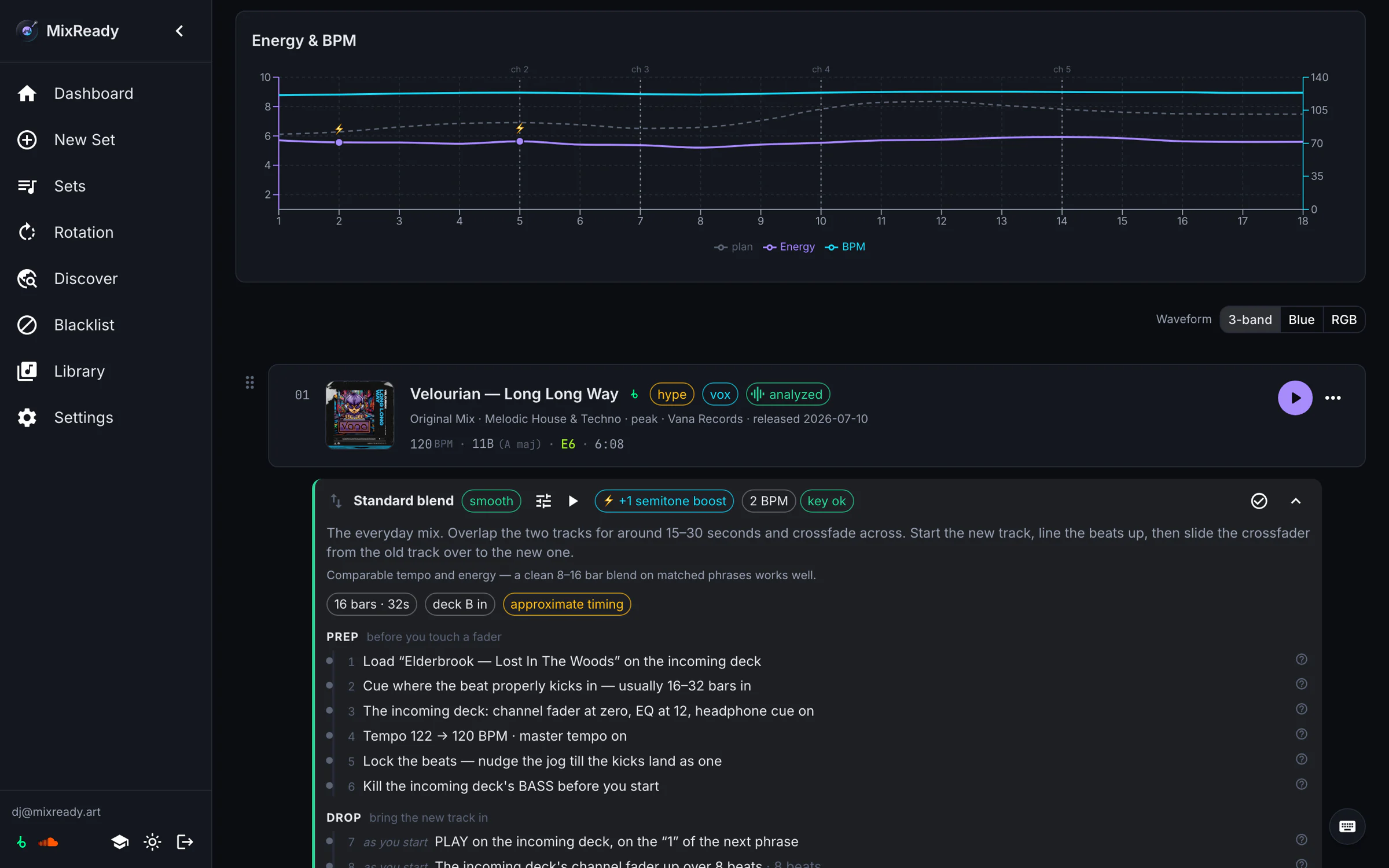
Every transition becomes a numbered, beat-counted checklist — which deck, which knob, over how many beats — with a plain line under each step saying why.
- The set becomes a practice sheet. One transition at a time, in order or hardest first. Printable.
- This transition's numbers, not generic advice — "tempo 122 → 120", "kill the bass before it comes in".
- Nothing is taken away. Outgrow it, flip to Standard. Same set.
It learns from sets that were actually played
Feed it 1001tracklists pages and it learns what really gets played next to what. That's the difference between a plausible tracklist and one that mixes like the real thing.
- Real transitions carry weight. One that two pros have actually played beats one that only looks right on paper.
- Your history counts too. Swap a pick out and that artist is quietly demoted next time.
Promos and edits, not just what's in the store
MixReady reads your rekordbox library and treats the files you own as a first-class source next to Beatport and SoundCloud — full tracks, not two-minute previews.
- Read-only by default. It never touches an audio file, and writes to rekordbox only when you ask.
- Matching you can trust. Every match is double-checked against BPM, key and length, so junk tags still land on the right track.
- Your audio stays home. Only the analysis goes up — kilobytes per track.
Find the thing you didn't know to search for
Shelves built from your own crate and from real sets — not a storefront.
- Start from your crate — related tracks, anchored on things you already own.
- Trending in rotation — what's moving in the sets you've fed it, not a chart.
- Straight into a set. One click to must-plays.
Every genre, described in words
46 genres and 160 sub-styles, each with a written description, the tempo it sits at and where in a night it belongs. Nobody publishes this — so it was all written by hand.
- Sub-styles get their own line. Liquid, jungle and halftime are all "drum & bass, 170–180" — and completely different rooms.
- In the builder, not just the browser. Pick a genre and its description sits right under the field.
- Useful on day one. It's the one page that's already full before you've connected anything.
Melodic House & Techno
118–124 BPMEmotive, arpeggio-led club music. Afterlife-adjacent. Nothing to do with melodic bass.
Emotional peak music at a walking tempo. Long builds, an arpeggio that keeps climbing, a breakdown people film.
Drum & Bass
170–180 BPMBreakbeats over heavy sub — spans liquid, neurofunk and jungle.
The 90s original — chopped Amen breaks and a reggae sub, no straight beat.
Amapiano
108–118 BPMSouth African hybrid of deep house and jazz over log-drum basslines — slow, spacious, and unmistakably groovy.
The log drum is the hook. At 112 it takes planning to mix into a house set, which is exactly why it lands so hard when it works.
Three of the 46, written out as the app shows them.
A set you can load, not a list you have to retype
The point of the whole thing is the moment it lands on your gear. Every route out is one menu.
A real playlist
Pushed to your Beatport account, so it streams straight into any LINK-capable DJ app.
Written straight into rekordbox
Added directly to rekordbox, or exported as XML if you'd rather do the import yourself.
Mix cues already set
The in and out points for each transition, written onto the tracks and waiting on next launch.
Playlist push
The same set as a SoundCloud playlist, for the tracks that live there.
Set player
Hear the whole set as a trailer — every transition back-to-back — before you commit to any of it.
Practice sheet
The whole set as steps — in play order or hardest first. Printable, so you can take it to the decks.
Small on purpose — and you'd be in it
MixReady is early. The alpha is deliberately small so every piece of feedback actually changes the product, and so nothing gets lost in a queue. It's free while it lasts, and things will break.
- MachineA Mac, or a 64-bit Windows 10/11 PC. The installer isn't signed yet, so both will warn you once on first launch — the docs walk you through it.
- BeatportAn account — to pull what you own into your crate and push playlists back. LINK only if you want to stream the result.
- rekordboxOptional but recommended. It's how MixReady sees the files you own.
- SoundCloudOptional. Connect it and your likes join the crate.
- TimeAn hour to set up and build your first few sets, then tell us where it's wrong.
The short version
Does it mix for me?
No. MixReady picks the tracks, orders them, and shows you how each transition should go. You still play it. Set builder, not auto-DJ.
I'm new to this. Is it for me?
Especially. Beginner mode turns every transition into a numbered checklist with its actual numbers, and writes the timing into rekordbox as cue points. A first-class mode, not a stripped-down one.
I don't actually know what half these genre names mean.
Then read them. Every genre in the app has a written description — what it sounds like, its tempo, where in a night it sits, who defines it. Useful before you've connected anything.
Does my music get uploaded?
No. Audio never leaves your machine. Only the analysis — BPM, key, energy, mix points — goes up, and that's kilobytes per track.
Will it touch my rekordbox library or my files?
It reads rekordbox read-only and never modifies an audio file. It writes only when you explicitly choose "Add to rekordbox" or "Write mix cues".
Do I need a Beatport subscription?
An account is enough to build and push playlists. A LINK subscription only matters if you want to stream the result in your DJ app — playing files you own doesn't need it.
What if it picks something I'd never play?
Swap it for a ranked alternative that still fits its neighbours, or blacklist it for good. Swaps are remembered.
Does it work with music that isn't on Beatport?
Yes — anything in your rekordbox library, promos and edits included. Unmatched files stay fully playable and get sequenced on rekordbox's own analysis.
How long does a set take to build?
About a minute, whether it's 60 minutes of music or 180. The first Beatport import adds about half a minute, once.
What does it cost?
Nothing during the alpha. There's no pricing yet and no card to enter.
Can I practise a transition before I play it?
That's the Transition Lab: a two-deck mixer on those two records. Let the plan drive, or take over and run the move yourself — drag the mix points, compare versions, keep the one that sounds right.
What isn't finished?
Per-pick "why this track" explanations, and the loop that feeds played sets back into what it's learned. Genre coverage is strongest in house and techno.
Windows? Serato? Traktor?
Windows is in — 64-bit Windows 10/11, same app, same features (not ARM). Serato and Traktor aren't: MixReady speaks rekordbox, and the XML export is the escape hatch.